Image · GPT Image 2
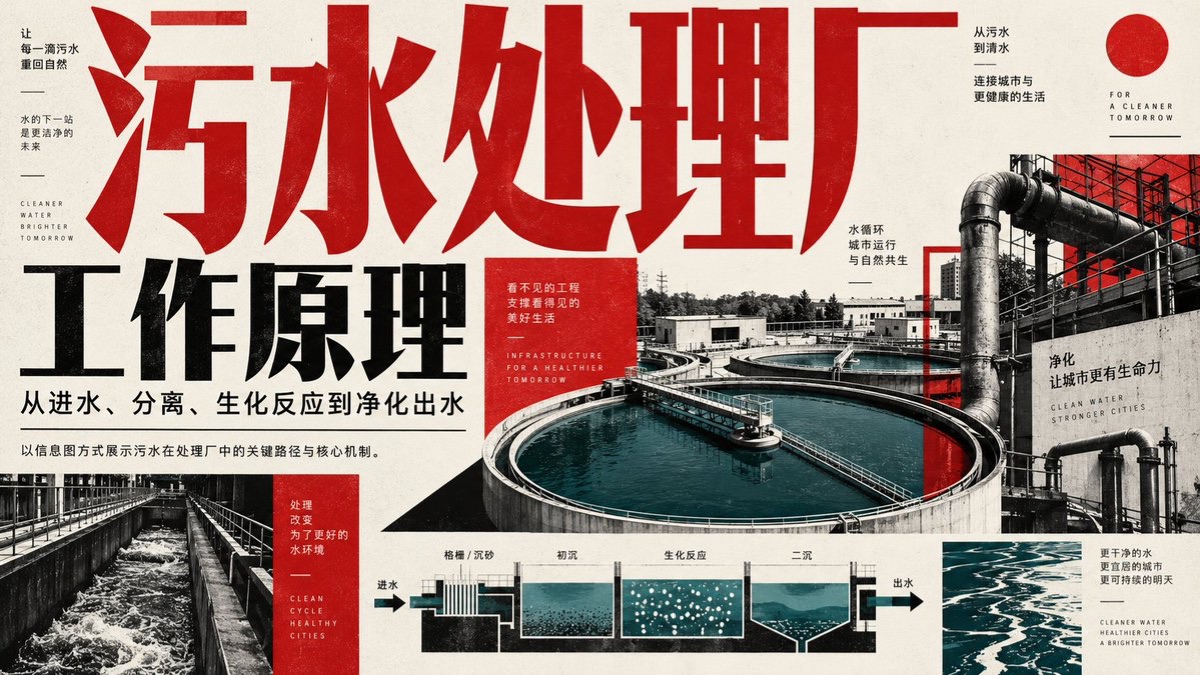
Wastewater treatment plant process infographic
Combine an industrial facility scene, process arrows, and sectional descriptions into a red, black, and white infographic suitable for practicing an engineering-themed layout; verify the process steps and technical data separately.
小小东@xiaoxiaodong01Prompt
Create a horizontal infographic poster explaining how a wastewater treatment plant works. The design should be industrial, modern, and high-contrast, using a deep red, black, and white color scheme with cyan/blue accents for the water elements.

**Layout and text elements:**
1. **Top left/center (Title):** Large, bold, distressed red Chinese characters spanning the top: “污水处理厂”. Below them, large black bold text: “工作原理”. Further below, smaller black text: “从进水、分离、生化反应到净化出水”.
2. **Left sidebar:** A vertical layout containing small text blocks. Top text block: “让每一滴污水重回自然”, “水的下一站是更洁净的未来”, English text “CLEANER WATER BRIGHTER TOMORROW”. Bottom text block (red background): “处理改变为了更好的水环境”, English text “CLEAN CYCLE HEALTHY CITIES”.
3. **Right side (Background image):** A large photographic collage showing an aerial view of circular clarifier tanks filled with blue-green water, connected by pipes and walkways. Overlay text on the right: “从污水到清水”, “连接城市与更健康的生活”, “FOR A CLEANER TOMORROW”, “水循环 城市运行 与自然共生”, “净化 让城市更有生命力”, “CLEAN WATER STRONGER CITIES”.
4. **Bottom center (Flowchart):** A schematic cross-section showing water flowing through different stages. Arrows indicate the direction from left to right. Labels above the sections: “格栅 / 沉砂”, “初沉”, “生化反应” (depicted as bubbles), “二沉”. End labels: “进水” on the left and “出水” on the right.
5. **Bottom right:** Small text block: “更干净的水 更宜居的城市 更可持续的明天”, English text “CLEANER WATER HEALTHIER CITIES A BRIGHTER TOMORROW”.
6. **Central red box:** A small red square containing white text: “看不见的工程 支撑看得见的美好生活”, English text “INFRASTRUCTURE FOR A HEALTHIER TOMORROW”.

**Visual style details:**
* Apply a grain-texture overlay across the entire image to create the feel of printed paper.
* Typeset the Chinese characters in a heavy sans-serif font.
* The water in the photographs and charts should appear distinctly cyan/blue-green against the grayscale/red/black background.
创建一张横向信息图海报,解释污水处理厂的工作原理。设计风格为工业风、现代感且高对比度,采用深红、黑、白以及用于水元素的青/蓝配色方案。
**布局与文本元素:**
1. **左上/居中(标题):** 顶部横跨大号、粗体、做旧效果的红色中文字符“污水处理厂”。其下方为大号黑色粗体文字“工作原理”。再下方为较小的黑色文字:“从进水、分离、生化反应到净化出水”。
2. **左侧边栏:** 垂直布局,包含小文本块。顶部文本块:“让每一滴污水重回自然”,“水的下一站是更洁净的未来”,英文文本“CLEANER WATER BRIGHTER TOMORROW”。底部文本块(红色背景):“处理改变为了更好的水环境”,英文文本“CLEAN CYCLE HEALTHY CITIES”。
3. **右侧(背景图像):** 大型摄影拼贴画,展示充满蓝绿色水的圆形澄清池的鸟瞰图,由管道和走道连接。右侧叠加文本:“从污水到清水”,“连接城市与更健康的生活”,“FOR A CLEANER TOMORROW”,“水循环 城市运行 与自然共生”,“净化 让城市更有生命力”,“CLEAN WATER STRONGER CITIES”。
4. **底部居中(流程图):** 示意图横截面,展示水流经不同阶段的过程。箭头指示从左到右的方向。各部分上方标签:“格栅 / 沉砂”,“初沉”,“生化反应”(以气泡描绘),“二沉”。两端标签:左侧为“进水”,右侧为“出水”。
5. **右下角:** 小文本块:“更干净的水 更宜居的城市 更可持续的明天”,英文文本“CLEANER WATER HEALTHIER CITIES A BRIGHTER TOMORROW”。
6. **中心红框:** 一个包含白色文字的小红色方块:“看不见的工程 支撑看得见的美好生活”,英文文本“INFRASTRUCTURE FOR A HEALTHIER TOMORROW”。
**视觉风格细节:**
* 在整个图像上使用颗粒质感叠加层,以营造印刷纸张的感觉。
* 中文字体的排版应使用厚重的无衬线字体。
* 照片和图表中的水应在灰度/红/黑背景下呈现独特的青色/蓝绿色。
How to use
The source artwork combines a photograph of a wastewater treatment facility with four process descriptions in one layout.