图片
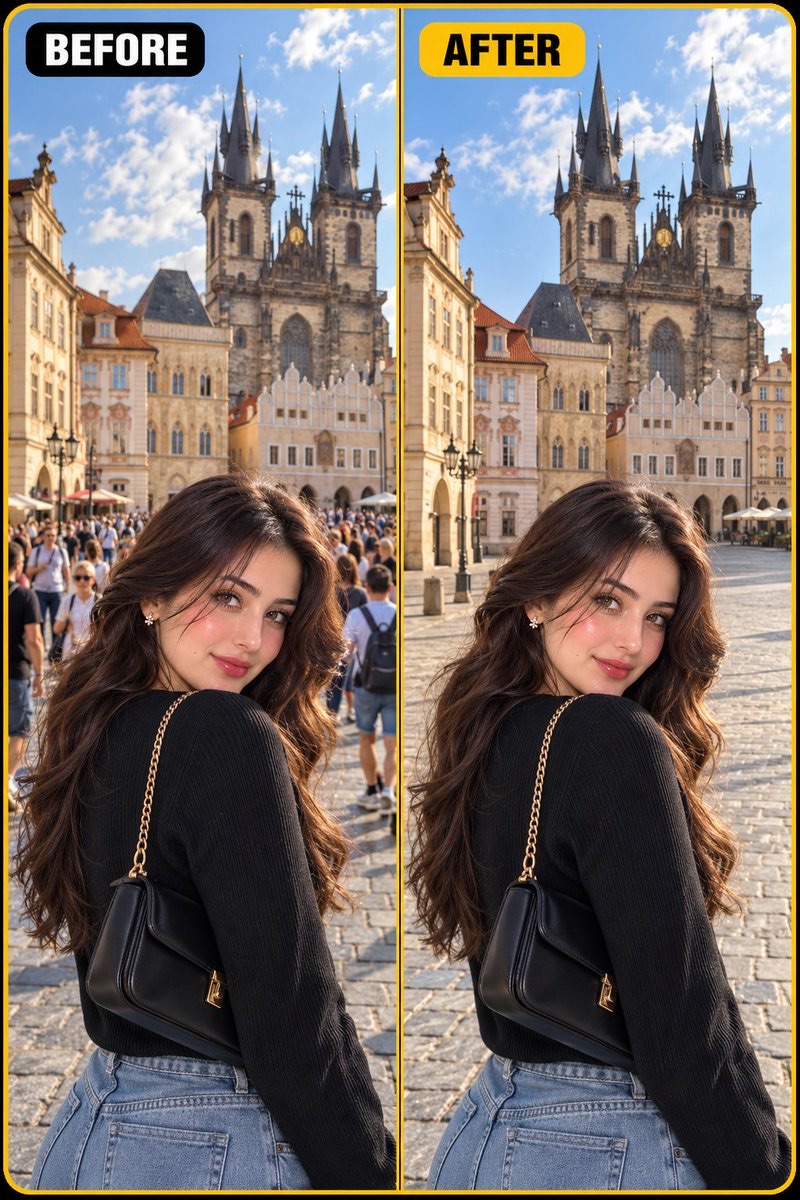
保留主体的自然去人修图
根据上传照片移除背景中的路人或人群,同时保持主体、建筑、透视、光线与原始构图不变,并自然补全被遮挡环境。
 M. Asif@meAsifAi
Prompt
参考图锁定——重要:

将上传的图像作为首要且严格的视觉参考。进行照片级写实的AI照片清理/编辑,同时尽可能准确地保留原图。

### 主要编辑——移除多余人物/人群

自动识别并移除上传图像中所有多余的、不必要的、背景中的、路人、游客、行人、人群以及随机出现的人物。

目标是让场景看起来自然干净、宽敞、不那么拥挤,仿佛拍摄照片的那一刻这些多余的人并不在场。

重要:
- 不要移除照片中有意拍摄的主体/人物。
- 完全按原图所示保留主体。
- 如果存在多个明显有意拍摄的主体,请全部保留。
- 只移除偶然入镜、多余或属于背景人群的人物。
- 不要改变主体的面部、身份、性别、发型、皮肤质感、身体比例、服装、配饰、姿势、表情或位置。
- 不要用另一个人替换主体。
- 不要改变主体的外观。

### 环境保留锁定

移除多余人物后,请根据原始环境的真实延续,重建被他们遮挡或位于其周围的区域。

须精确保留:
- 建筑
- 楼宇
- 街道
- 道路
- 人行道
- 铺装路面
- 地面
- 墙壁
- 窗户
- 门
- 标牌和环境细节
- 树木和植物
- 非人物的车辆
- 家具和物品
- 自然阴影
- 倒影
- 透视
- 空间纵深
- 光线方向
- 天气
- 时间段
- 色彩搭配
- 整体氛围

重建的区域必须看起来完全自然、符合物理真实,仿佛那些人从未出现过。

### 智能人群移除

根据上传图像的视觉语境,自动判断哪些人物是多余的。

移除:
- 背景行人
- 游客
- 随机路人
- 人群
- 站在主体身后的人
- 穿过画面构图的人
- 部分遮挡环境的人
- 远处的小人物
- 不必要的前景人物
- 出现在画面边缘的随机人物

不要移除:
- 主要主体
- 任何有意摆姿势的次要主体
- 明显属于预期前景动作的人物(如果移除他们会改变照片所讲述的故事)

如有不确定,优先保留明显有意拍摄的主体,并移除偶然入镜的背景人物。

### 自然重建

在人物被移除之处,智能重建其背后的真实环境。

匹配周围的:
- 纹理
- 建筑
- 铺装图案
- 阴影
- 光线
- 透视
- 景深
- 倒影
- 色彩
- 大气透视(空气透视:远处景物因空气和雾气而产生色彩、对比度和清晰度的渐变衰减)

不要产生明显的克隆图案、人工修补痕迹、重复纹理或模糊的擦除区域。

最终结果必须看起来像一张真实的专业照片,拍摄时没有多余的人群。

### 构图锁定

保留原始的:
- 图像尺寸
- 宽高比
- 取景
- 相机角度
- 焦距观感
- 透视
- 主体比例
- 主体位置
- 裁切
- 地平线
- 构图

不要放大、缩小、裁切、旋转、拉伸或重新设计照片。

唯一重大的修改应当只是移除多余人物/人群。

### 照片真实感锁定

最终图像必须看起来像一张真实的高端照片。

使用:
- 自然的人物细节
- 真实的环境纹理
- 物理准确的阴影
- 真实的阳光
- 可信的倒影
- 自然的景深
- 真实的透视
- 无缝的背景重建
- 专业摄影品质

绝对不能有任何可见的数字移除人物的痕迹。

### 重要的通用规则

无论以下哪种情况,此提示词都必须适用:
- 国家
- 城市
- 地标
- 旅游景点
- 街道
- 海滩
- 市场
- 历史遗址
- 购物区
- 节庆场所
- 公共广场
- 餐厅
- 室内场所
- 室外场所
- 建筑风格
- 光照条件

先理解上传的图像,再根据图像中实际显示的地点来调整重建。

不要虚构不同的地点。
不要重新设计环境。
不要改变建筑。
不要改变主体。

只需移除多余人物,并自然地重建他们身后的一切。

### 最终质量检查

在生成最终图像之前,请确认:
1. 主体保持不变。
2. 所有不必要的背景人物均已移除。
3. 没有残留被移除人物的身体部位、手、头部或影子。
4. 被移除人物身后的环境已被自然重建。
5. 建筑和透视保持一致。
6. 光线和阴影保持物理上可信。
7. 看不到克隆痕迹或重复纹理。
8. 看不到模糊斑块或AI生成的畸变。
9. 最终图像看起来像一张原始照片,而不是编辑过的图像。

### 负面提示词

不要改变主体,不要改变身份,不要改变性别,不要改变面部,不要改变发型,不要改变服装,不要改变姿势,不要改变表情,不要改变身体比例,不要改动建筑,不要改动构图,不要裁切,不要缩放,不要旋转,不要重复的人物,不要幽灵般的人影,不要残留身体部位,不要悬浮的肢体,不要人工阴影,不要克隆纹理,不要重复图案,不要扭曲的建筑,不要变形的物体,不要模糊斑块,不要虚假背景,不要CGI,不要3D渲染,不要插画,不要卡通,不要塑料质感,不要过度平滑,不要不真实的重建,不要水印,不要标志,不要多余元素。
REFERENCE IMAGE LOCK — IMPORTANT:
Use the uploaded image as the PRIMARY and STRICT visual reference. Perform a photorealistic AI photo cleanup/edit while preserving the original image as accurately as possible.
### MAIN EDIT — REMOVE UNWANTED PEOPLE / CROWD
Automatically identify and remove ALL unwanted, unnecessary, background, bystander, tourist, pedestrian, crowd and randomly appearing people from the uploaded image.
The goal is to make the location look naturally clean, spacious and less crowded, as if the photograph was captured at a moment when those unwanted people were not present.
IMPORTANT:
- Do NOT remove the main subject/person intentionally featured in the photograph.
- Preserve the main subject exactly as shown in the original image.
- If there are multiple clearly intentional/main subjects, preserve them.
- Remove only people who are incidental, unwanted or part of the background crowd.
- Do not alter the main subject's face, identity, gender, hairstyle, skin texture, body proportions, clothing, accessories, pose, expression or position.
- Do not replace the main subject with a different person.
- Do not change the main subject's appearance.
### ENVIRONMENT PRESERVATION LOCK
After removing the unwanted people, reconstruct the areas that were hidden behind or around them using realistic continuation of the original environment.
Preserve exactly:
- Architecture
- Buildings
- Streets
- Roads
- Sidewalks
- Pavement
- Floors
- Walls
- Windows
- Doors
- Signs and environmental details
- Trees and plants
- Vehicles that are not people
- Furniture and objects
- Natural shadows
- Reflections
- Perspective
- Depth
- Lighting direction
- Weather
- Time of day
- Color palette
- Overall atmosphere
The reconstructed areas must look completely natural and physically believable, as if the people had never been there.
### SMART CROWD REMOVAL
Automatically determine which people are unwanted based on the visual context of the uploaded image.
Remove:
- Background pedestrians
- Tourists
- Random passersby
- Crowds
- People standing behind the subject
- People walking through the composition
- People partially blocking the environment
- Small distant people
- Unnecessary foreground people
- Random people appearing at the edges of the frame
Do NOT remove:
- The primary subject
- Any intentionally posed secondary subject
- People who are clearly part of the intended foreground action, if removing them would change the story of the photograph
If uncertain, prioritize preserving the clearly intended subject(s) and removing incidental background people.
### NATURAL RECONSTRUCTION
Where people are removed, intelligently reconstruct the exact environment behind them.
Match the surrounding:
- textures
- architecture
- pavement patterns
- shadows
- lighting
- perspective
- depth of field
- reflections
- color
- atmospheric perspective
Do not create obvious cloned patterns, artificial patches, repeated textures or blurry erased areas.
The final result must look like a genuine professional photograph captured without the unwanted crowd.
### COMPOSITION LOCK
Preserve the original:
- image dimensions
- aspect ratio
- framing
- camera angle
- focal length appearance
- perspective
- subject scale
- subject position
- crop
- horizon
- composition
Do NOT zoom in, zoom out, crop, rotate, stretch or redesign the photograph.
The ONLY significant modification should be the removal of unwanted people/crowd.
### PHOTOREALISM LOCK
The final image must look like an authentic high-end photograph.
Use:
- natural human details
- realistic environmental textures
- physically accurate shadows
- realistic sunlight
- believable reflections
- natural depth of field
- realistic perspective
- seamless background reconstruction
- professional photography quality
There must be absolutely no visible evidence that people were digitally removed.
### IMPORTANT UNIVERSAL RULE
This prompt must work regardless of:
- country
- city
- landmark
- tourist location
- street
- beach
- market
- historical site
- shopping area
- festival location
- public square
- restaurant
- indoor location
- outdoor location
- architecture style
- lighting condition
Understand the uploaded image first and adapt the reconstruction to the actual location shown in that image.
DO NOT invent a different location.
DO NOT redesign the environment.
DO NOT change the architecture.
DO NOT change the main subject.
Simply remove the unwanted people and naturally reconstruct everything that was behind them.
### FINAL QUALITY CHECK
Before generating the final image, verify that:
1. The main subject remains unchanged.
2. All unnecessary background people have been removed.
3. No body parts, hands, heads or shadows from removed people remain.
4. The environment behind removed people is naturally reconstructed.
5. Architecture and perspective remain consistent.
6. Lighting and shadows remain physically believable.
7. No cloning artifacts or repeated textures are visible.
8. No blur patches or AI-generated distortions are visible.
9. The final image looks like an original photograph, not an edited image.
### NEGATIVE PROMPT
Do not change the main subject, do not change identity, do not change gender, do not change face, do not change hairstyle, do not change clothing, do not change pose, do not change expression, do not change body proportions, do not alter architecture, do not alter composition, do not crop, do not zoom, do not rotate, no duplicated people, no ghost people, no leftover body parts, no floating limbs, no artificial shadows, no cloned textures, no repeated patterns, no warped buildings, no distorted objects, no blurry patches, no fake background, no CGI, no 3D render, no illustration, no cartoon, no plastic textures, no oversmoothing, no unrealistic reconstruction, no watermark, no logo, no extra elements.
使用建议
使用建议:上传需要清理的照片,并明确保留的主体;适合旅游地标、街景和室内场景,生成后重点检查主体身份、建筑结构与补全区域是否自然。