Image · Nano Banana Pro
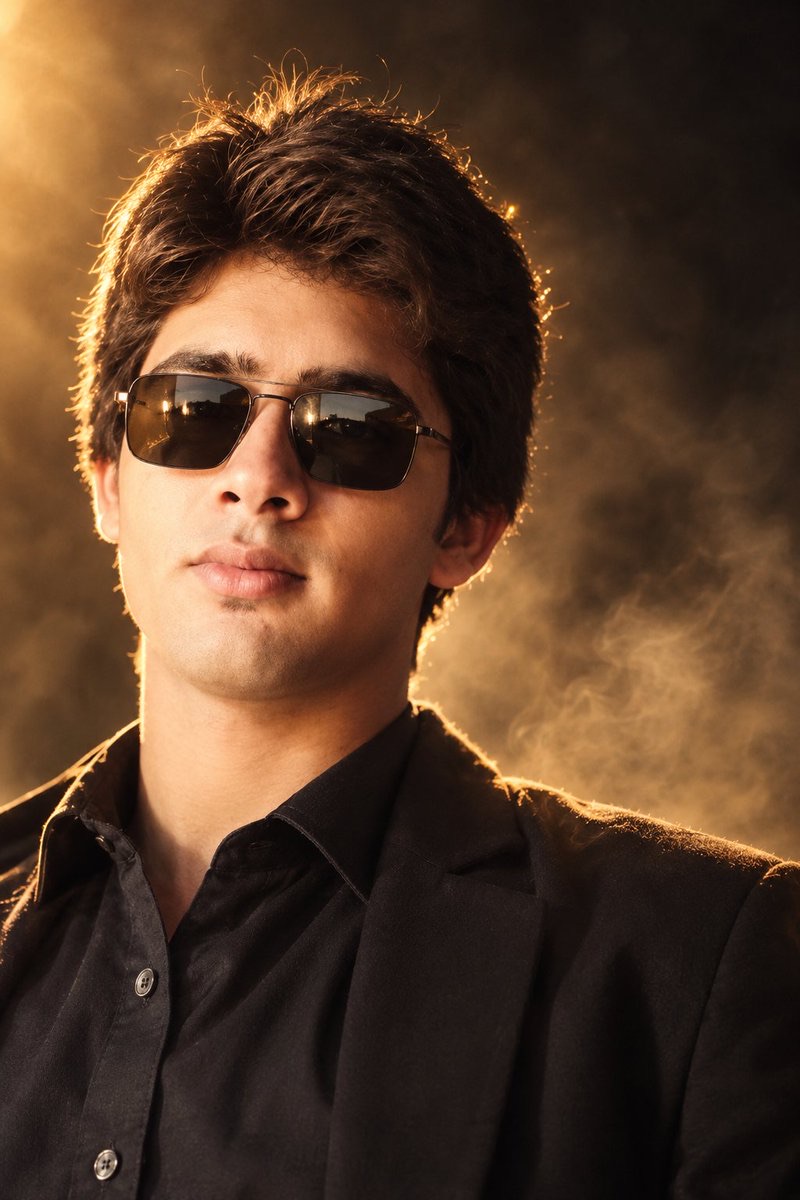
Use golden backlighting for a cinematic portrait
Let the outline emerge from the dark background while preserving details in the hair and skin.
 Muhammad Jamil@JamilAI55
Prompt
Analyze the uploaded reference image and recreate its precise cinematographic style.

Create a high-end cinematic male portrait with the same visual language as the reference image.

Preserve:

Warm golden backlighting around the hair

A dark, moody background

Soft atmospheric smoke/haze

Strong rim lighting

Warm skin illumination

Deep cinematic shadows

Natural skin texture

A thick, textured hairstyle with clear strand detail

Dark fashionable clothing

Sunglasses with realistic reflections

The same close-up portrait composition

The same refined editorial-style atmosphere

The same shallow depth-of-field effect

The same warm brown/golden color grading

The lighting should appear physically realistic, with golden light separating the subject from the dark, smoky background.

85mm portrait-lens perspective, shallow depth of field, f/1.4 aesthetic effect, realistic skin pores, natural facial texture, realistic hair strands, cinematic HDR, professional fashion photography, 8K Ultra HD.

Keep the face natural and well-proportioned. Do not make the skin look plastic. No exaggerated facial features, artificial eyes, distorted glasses, or watermarks.
分析上传的参考图并复现其精确的电影摄影风格。
创建与参考图具有相同视觉语言的高端电影感男性人像。
保留:
头发周围的温暖金色逆光
黑暗且充满情绪的背景
柔和的大气烟雾/朦胧感
强烈的轮廓光
温暖的皮肤照明
深邃的电影感阴影
自然的皮肤纹理
具有清晰发丝细节的厚实纹理发型
深色时尚服装
带有真实反射的太阳镜
相同的特写人像构图
相同精致的编辑风格氛围
相同的浅景深效果
相同的暖棕色/金色色调分级
光线应呈现物理上的真实感,金色光线将主体从黑暗烟雾背景中分离出来。
85mm 人像镜头视角,浅景深,f/1.4 美学效果,真实的皮肤毛孔,自然的面部纹理,逼真的发丝,电影级 HDR,专业时尚摄影,8K Ultra HD。
保持面部自然且比例协调。不要使皮肤看起来像塑料。没有夸张的面部特征,没有人造眼睛,没有扭曲的眼镜,没有水印。
How to use
The original requires a style reference image; upload it yourself in the target tool. What is shown here is the generated result, not the original input. First retain the golden rim light, dark background, and close-up composition, then replace the clothing or character description. Terms such as 8K are generation requirements and do not represent the actual resolution of the preview file.
Details
- Type
- Image
- Model
- Nano Banana Pro
- Source
- Muhammad Jamil
- License
- CC-BY-4.0